Hivemind 2026.04.01: Projects, Mobile, and a Real Team Protocol
· Hivemind Team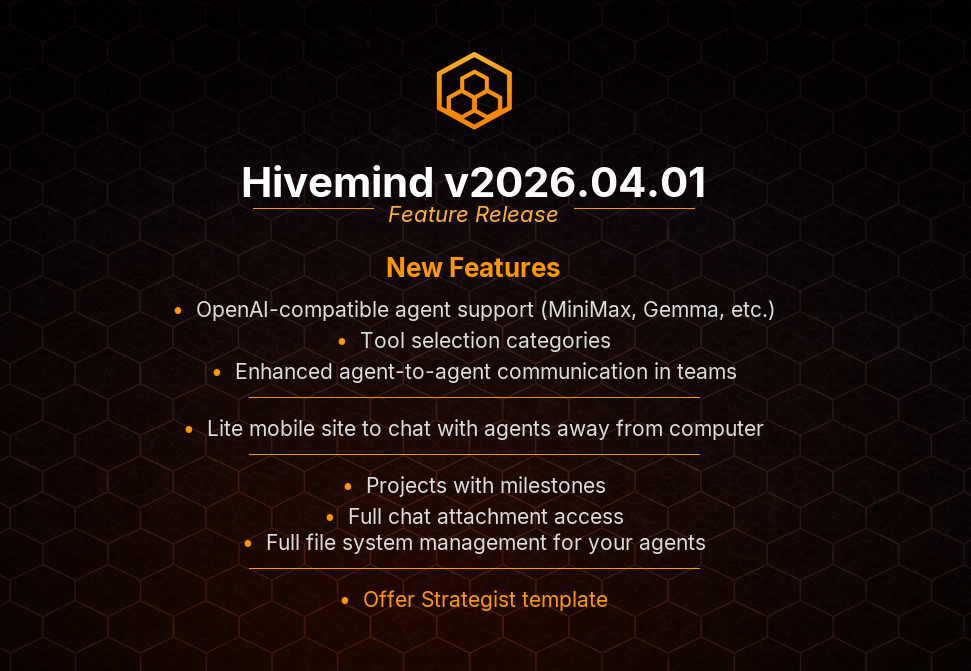
Projects. Mobile. And Agents That Actually Coordinate.
This release is about turning Hivemind from a tool into a workspace. Full project lifecycle management, a mobile experience that finally feels native, and a real communication protocol between agents. 24 changes since 2026.03.02.
Here's what shipped.
Tool-Based Agent-to-Agent Communication
This is the headline. Agents in a team chat can now communicate with each other through a dedicated tool-based protocol — not just prompt chaining, not just delegation handoffs, but structured, tool-mediated conversation between agents in the same team.
What this means in practice: your Research agent can ask your Code agent to review a file. Your Project Manager agent can check in on your DevOps agent's progress. The communication happens through the same tool system everything else in Hivemind uses — logged, auditable, and controllable.
This was always the vision for Hivemind's team model. Individual agents are useful. Agents that can coordinate are powerful. This release makes that coordination native.
Workspace File Manager
Every agent now has a proper file management interface. The new Agent Workspace File Manager gives you visibility into what each agent is working with — files created, modified, or stored during tool execution.
The top-level Workspace File Browser in the sidebar takes it further. Browse files across all agent workspaces from one place. No more SSH-ing into containers or guessing what an agent created during a long-running task.
This pairs with the new chat_attachments tool — agents can now access files you upload directly in chat. Drop a PDF, a CSV, a code file into the conversation, and your agent can read it, process it, and work with it. File uploads were silently failing before due to a Turbo conflict. That's fixed now too.
Project Lifecycle Management
The project_update tool has been expanded from a simple status updater into a full project lifecycle manager. Agents can now:
- Create and manage projects end-to-end
- Set milestones with clickable detail pages
- Track progress across project phases
- Update status, scope, and deliverables
The new clickable milestone cards give you a visual timeline of project progress — click into any milestone to see the full detail page with status, tasks, and agent activity.
If you're using Hivemind for project coordination — research projects, content pipelines, engineering sprints — this is the feature that makes agents real project participants, not just task executors.
Smarter Delegation
Delegation got a significant architectural upgrade in this release.
Async delegate replaces spawn. The old spawn pattern for sub-agent creation has been replaced with a proper async delegation model. When an agent delegates work, it gets a delegation_status tool to check progress — no more fire-and-forget. The delegating agent stays informed without blocking.
Polling backoff hints. Status-checking tools now include backoff hints so agents don't hammer the delegation endpoint. Smart polling instead of constant checking.
Self-delegation loop fixed. An agent could previously get stuck delegating to itself in an infinite loop. That's killed.
Delegate tools stripped from team chats. Team chat agents no longer see delegation tools that don't apply in their context. Cleaner tool selection, fewer confused tool calls.
OpenAI-Compatible API Keys and Manual Model Entry
You can now add any OpenAI-compatible provider with manual API key and model name entry. No more waiting for Hivemind to add official support for your inference server — if it speaks the OpenAI protocol, you can use it right now.
Enter the base URL, paste your API key, type the model name, done. This works with vLLM, Together AI, Fireworks, Groq, and anything else that implements the OpenAI-compatible API.
Categorized Tool Selection
The agent edit page now organizes tools into categories instead of presenting one massive flat list. Finding and enabling the right tools for an agent is now intuitive instead of overwhelming.
This matters more than it sounds. When you have 40+ tools available, a flat checkbox list is hostile UX. Categories — communication, file management, research, code, project management — let you quickly enable the right capabilities for each agent's role.
Mobile PWA — Actually Usable Now
Five PWA issues were resolved in a single focused PR:
- Layout issues on smaller viewports
- Touch interaction bugs
- Navigation inconsistencies
- Offline handling improvements
- Visual polish for mobile-specific UI elements
If you've been using Hivemind from your phone and it felt rough — it should feel right now. The hive goes where you go.
Offer Strategist Template
New agent template: the Offer Strategist. Designed for teams building products or services, this agent helps craft positioning, pricing strategies, and offer structures.
Every template in Hivemind ships with a real personality, real tool assignments, and real memory awareness. Not a stub — a deployable specialist you can customize for your domain.
Bug Fixes Worth Calling Out
Blank agent message bubbles — agents were sometimes rendering empty message bubbles in both team chat and 1:1 conversations. Both are fixed. You'll actually see what your agents are saying now.
GHCR images not pulling on install/upgrade — the container registry images weren't pulling correctly during fresh installs and upgrades. If you had a clean install fail mysteriously, this was probably why. Fixed.
Hashtag actions and @mention persistence — #remember, #forget, and @mentions in team chat were intermittently failing to persist. The memory and mention systems now work reliably in team contexts.
Manual milestones broken on project creation — you could create a project but the manual milestone input was broken. Fixed alongside the broader project lifecycle expansion.
Missing cron jobs and archival memory consolidation — scheduled tasks and memory archival processes weren't initializing correctly in some deployment scenarios. Both are fixed and verified.
Dependency Updates
Rails bumped to 8.1.3, Anthropic SDK to 1.28.0, Thruster to 0.1.20, and Codecov action to v6. Nothing breaking — just staying current.
Upgrade
hivemind upgrade
No manual steps. The async delegation migration and project lifecycle schema changes apply automatically.
Full changelog: 2026.03.02 → 2026.04.01
Questions or feedback? Find us on Discord or open an issue on GitHub.